Research Agent Pipeline: An n8n Agent That Searches, Filters, and Writes the Report For You
You need a competitor analysis. So you open a dozen browser tabs, copy chunks of text into a doc, and spend the rest of the afternoon turning that mess into something readable. This template compresses that whole process into one message: give it a topic, get back a structured report.
What Makes This an "Agent" and Not Just a Script
Most of the automations on this site are single-step: a trigger fires, one LLM call runs, something comes out the other end. This one is different, and it's worth understanding why before you build it.
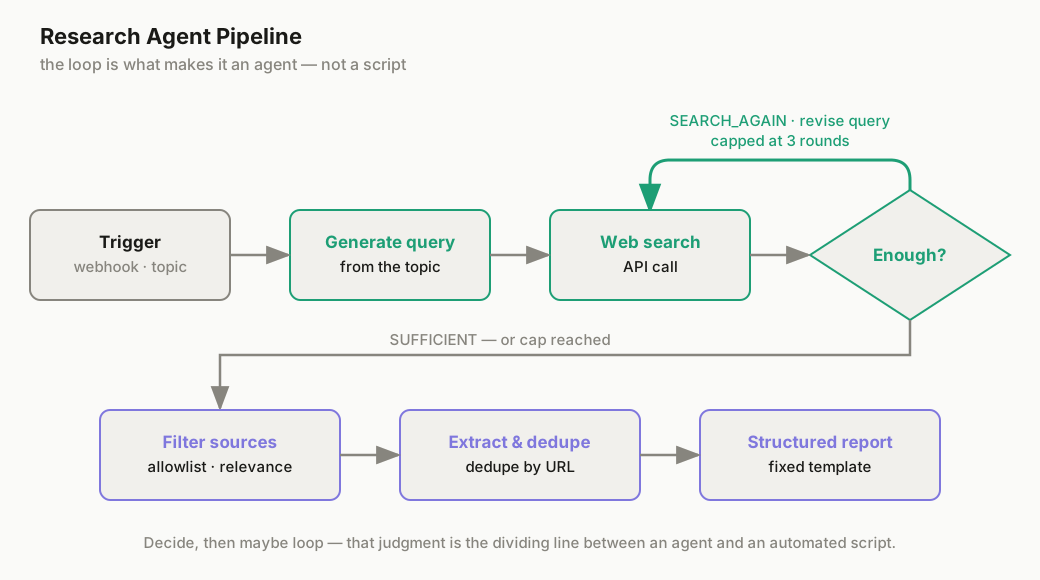
A single-step pipeline can't do research, because research isn't one decision — it's a chain of them. The agent has to generate a search query, look at what came back, and decide: is this actually useful, or do I need to search again with different terms? That "decide, then maybe loop" behavior is the actual dividing line between an agent and an automated script. If you want the concept explained from the ground up first, What Is an AI Agent? covers it.
This template is also a step up from the RAG-based customer support agent covered in an earlier tutorial. That one answers questions from a fixed, pre-loaded knowledge base — no tool calls, no live web access. This one calls a real tool (web search) and loops on its own judgment about whether it has enough. If the customer support agent was your first taste of retrieval, this is the version where the agent goes and finds the source material itself.
What You'll Need
- n8n, Cloud or self-hosted. If it's not running yet, the n8n installation guide covers three setup paths.
- A Claude API key, for the search-decision loop and the final report write-up.
- A web search API key. n8n doesn't have a native search node, so this runs through an HTTP Request to a search provider — Brave Search's API has a free tier and is the default we'd recommend if you haven't picked one; see How to Give AI Agents Web Access for other options (Tavily, Exa, and a few more).
Budget about 25 minutes for setup — this is a genuinely more involved template than most of what's in the Workflow section, mainly because of the decision loop in Step 2.
Step 1: Trigger
A Webhook node accepting a topic field is the simplest setup — send it a POST request (or wire it to a form) and the pipeline kicks off. If you'd rather run scheduled research on a recurring subject, swap the Webhook for a Schedule Trigger with the topic hardcoded or pulled from a Google Sheet row.
Step 2: The Search-and-Decide Loop
This is the part that makes the whole thing an agent instead of a script, so it's worth slowing down on.
The flow inside this loop:
- The model generates a search query from the topic.
- That query goes out through the web search API.
- The results get fed back to the model.
- The model judges: do I have enough to write a solid report, or not?
- If not, it revises the query — narrower, broader, or from a different angle — and searches again.
Left unbounded, that loop can run forever if the model keeps deciding "not quite enough yet." Cap it at a fixed number of rounds — three is a reasonable default — using a simple counter and an IF node that forces the pipeline forward once the cap is hit, even with imperfect results. A capped-but-imperfect report beats a workflow that never terminates.
The prompt driving the decision step needs to force an explicit judgment, not just a summary:
System: You are researching the topic: {{topic}}

You have the following search results so far:
{{accumulated_results}}

Round {{current_round}} of {{max_rounds}}.

Decide one of two things:
1. SUFFICIENT — you have enough to write a well-supported report.
2. SEARCH_AGAIN — specify a new search query that fills a specific gap
   (name the gap: missing data, no counter-argument found, sources are
   too old, etc.)

Respond in JSON: {"decision": "SUFFICIENT" | "SEARCH_AGAIN", "next_query": "...", "reason": "..."}
Forcing a reason field isn't decorative — it's what lets you debug a bad report later. If the final output is thin, you can look back at the loop's own reasoning and see exactly where it decided (wrongly) that it had enough.
Step 3: Source Filtering
Not every search result is worth feeding to the model. Before results reach the report-writing step, run them through:
- A trusted-domain allowlist (or a blocklist for obvious junk — content farms, SEO-spam aggregators) using an IF or Filter node.
- A relevance check — a lightweight second model call that scores each result against the original topic and drops anything below a threshold.
This step matters more than it looks like it should. A research agent with a great writing step and no filtering will confidently summarize low-quality sources with the same tone as high-quality ones — the report reads fine and is wrong. Filtering is where report quality actually gets won or lost.
Step 4: Extraction and Deduplication
Pull the actual article text out of each surviving result with an HTML Extract node — don't feed raw HTML into the model, it wastes tokens on markup. Then dedupe by URL before moving on: the same source showing up across multiple search rounds (common once you're on round 2 or 3 of the loop) will otherwise get counted — and cited — more than once.
Step 5: Structured Report Generation
This is where a forced template beats letting the model write freely. Give it a fixed markdown structure to fill in:
Write a research report using exactly this structure:

## Research Question
[restate the topic as a specific question]

## Key Findings
[3-6 findings, each with the source it came from]

## Sources
[list every source actually cited above, as a markdown list]

## Conclusion
[2-3 sentences — what this means, not a summary of the findings]

Do not add sections. Do not omit the Sources section, even if short.
Without a forced structure, model output tends to drift — sometimes a bullet list, sometimes prose, sometimes it skips citing sources entirely. A fixed template makes the output predictable enough to pipe into the next step without a human reformatting it first.
Step 6: Output
Route the finished report wherever you'd actually read it — a Notion page, a Google Doc, or straight to Telegram if you want it on your phone the moment it's done. All three are a single node in n8n; pick based on where you already work.
Get the Template
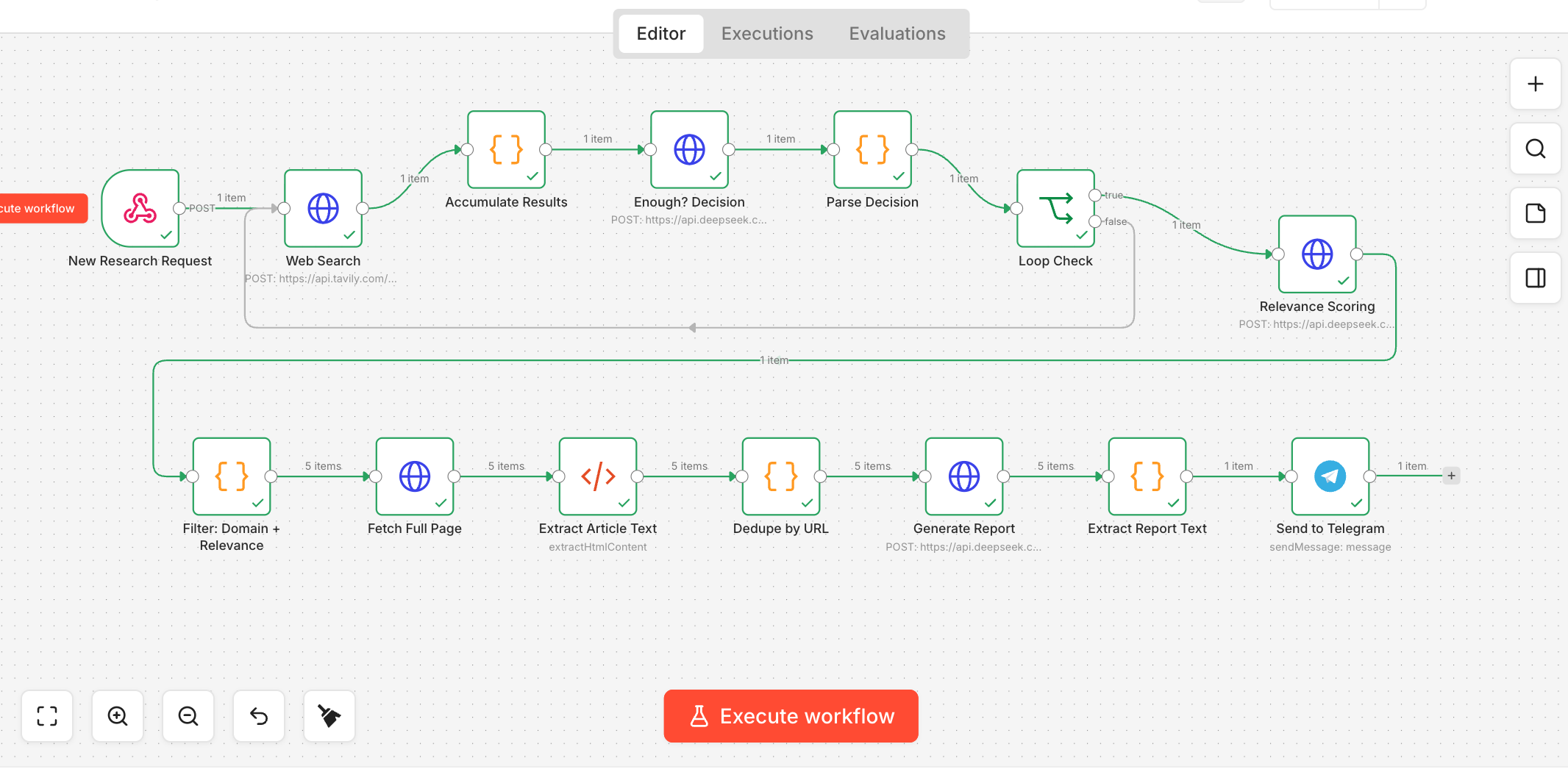
The full 14-node workflow — ready to import — is available in the Workflow section:
Download: Research Agent Pipeline Template
Open the link, select all the text (Ctrl/Cmd+A) and copy it (Ctrl/Cmd+C), then paste it (Ctrl/Cmd+V) directly onto a blank n8n canvas — n8n reads workflow JSON straight off the clipboard and builds all 14 nodes automatically. No file to save, no import dialog to hunt for.
Once it's in, drop your Claude and web search API keys into the corresponding credentials, and you'll see all six steps above as connected nodes.
The Part That Usually Trips People Up
Two failure modes account for most of the trouble here:
Search API quota or timeouts. Free tiers on search APIs often cap you at a low number of requests per second, and a loop that fires off queries in quick succession across multiple rounds can hit that limit fast. Add a short Wait node between search calls if you're seeing failures partway through a run.
The model ignores the report template. Even with a forced structure in the prompt, it'll occasionally drift — usually by adding a section that wasn't asked for, or dropping Sources when results were thin. A validation node (a regex or simple string check for the four required headers before the report ships) catches this before a malformed report reaches your inbox.
If you're getting valid output but it's thin — short findings, weak sources — the cause is almost never the writing step. It's round-1 query quality. About 90% of bad reports trace back to a vague first search query that never got corrected, because the model judged "sufficient" too early. If reports are consistently shallow, tighten the SUFFICIENT/SEARCH_AGAIN prompt in Step 2 before touching anything downstream.
Manual Research vs. This Template
| Manual Research | Research Agent Pipeline | |
|---|---|---|
| Time | 30–90 minutes per topic | 2–5 minutes, mostly unattended |
| Depth | Depends on your patience that day | Consistent — same process every run |
| Cost | Free (your time) | A few cents in API calls per report |
| Best for | One-off deep dives where nuance matters | Recurring research: competitor checks, weekly topic scans, first-pass drafts |
Bottom Line
The loop in Step 2 is the whole point of this template — everything else (filtering, extraction, the report format) is scaffolding around one decision the agent has to make well: do I actually have enough, or am I guessing? Get that judgment tuned with a good prompt and a sane round cap, and the rest of the pipeline mostly takes care of itself. Start with the 3-round default, run it against a topic you already know well so you can judge the output honestly, and adjust the decision prompt from there.
Further Reading
- How to Give AI Agents Web Access — the search-provider setup this template's Step 2 depends on
- Why Is My AI Agent So Slow? — if the multi-round loop is dragging, start here
- How to Run AI Agents 24/7 on a VPS — for turning this into a scheduled, recurring research job
- From Any Webpage to X-Ready Posts — another content-focused n8n template, if you want the report this pipeline produces turned into social copy next