What Is RAG? A Practical Guide for Anyone Using AI Agents
You ask your AI agent a question about a document sitting right there in your company's shared drive. It answers confidently — and it's wrong. Not vague, not hedging, just confidently, specifically wrong. It made something up because it never actually read the file. It only knows what it was trained on, and your internal document wasn't part of that.
This is the exact problem RAG was built to solve.
RAG in one sentence
RAG (Retrieval-Augmented Generation) is a technique that lets an AI model look things up before it answers, instead of relying only on what it memorized during training.
Think of it like the difference between a person answering a trivia question purely from memory, versus a librarian who walks over to the right shelf, pulls the exact book, and reads you the relevant page before answering. The librarian isn't smarter — they just know how to find the right source material first. That's what RAG gives an AI agent: a way to "look it up" instead of guessing.
Why not just make the context window bigger?
A natural question once you understand RAG: if the problem is "the model doesn't have my data," why not just paste all your documents into the prompt? Or fine-tune a model on your data directly?
Both are real options, but they come with trade-offs RAG is specifically designed to avoid:
| Approach | What it does | Where it struggles |
|---|---|---|
| Bigger context window | Paste more text directly into the prompt | Gets expensive fast, slows responses down, and the model still has to search through everything itself each time |
| Fine-tuning | Retrain the model on your specific data | Costly, slow to update when your data changes, and doesn't reliably teach the model new facts — it mostly changes style and behavior |
| RAG | Retrieve only the relevant pieces, then generate an answer from them | Requires some setup (a search step before generation), but stays cheap, current, and accurate as your data grows or changes |
If an AI agent needs to answer questions about a knowledge base that updates weekly, RAG is almost always the practical choice — you update the source documents, and the agent's answers update with them. No retraining required.
How RAG actually works, step by step
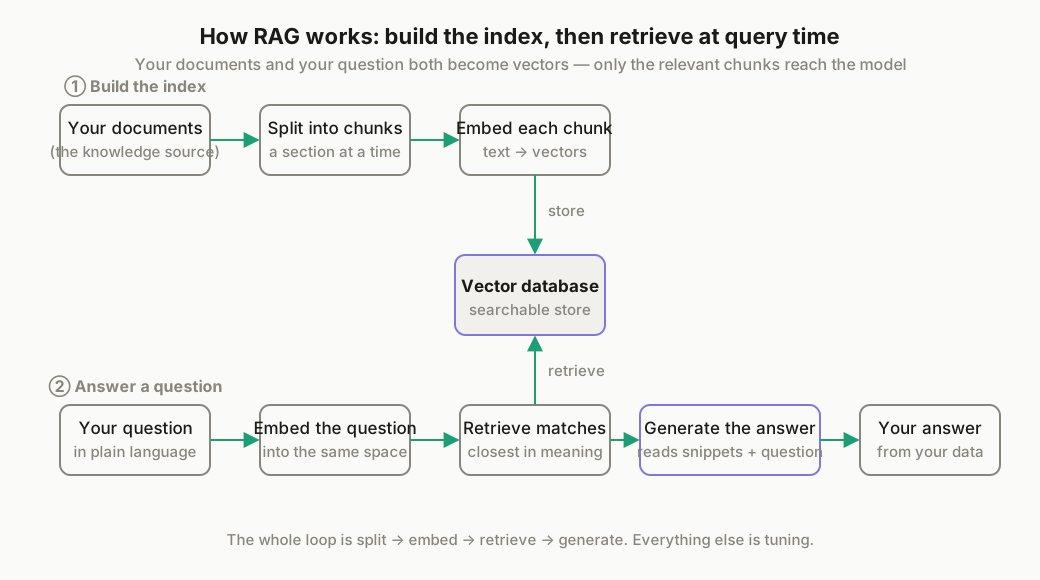
Strip away the jargon, and RAG is four steps repeating in a loop:
- Split your documents into chunks. A 50-page PDF gets broken into smaller pieces — a paragraph or a section at a time — so the system can retrieve just the relevant part later, not the whole document.
- Convert each chunk into a vector (embedding). This turns text into a list of numbers that represents its meaning, so pieces of text with similar meaning end up "close" to each other mathematically, even if they don't share the same exact words.
- Store those vectors in a searchable database. When someone asks a question, the system converts the question into a vector too, then finds the chunks whose vectors are closest to it — this is the "retrieval" part of RAG.
- Hand the retrieved chunks to the model, along with the original question. The model reads only the relevant snippets and generates its answer from them, instead of guessing from memory.
That loop — split, embed, retrieve, generate — is the entire mechanism. Everything else (which vector database you pick, how big your chunks are, how many results you retrieve) is a tuning detail on top of this core loop.
Where this actually shows up in AI agent workflows
RAG isn't a standalone product — it's a pattern you build into an agent. A few common shapes it takes:
- Customer support agents that answer from your actual product docs and past tickets, instead of giving generic responses
- Internal knowledge base assistants that let a team ask questions in plain language and get answers sourced from company wikis, PDFs, or Slack history
- Personal knowledge tools — a private, local setup where an individual can ask questions against their own notes or files without sending that data anywhere
We'll walk through building the first two of these hands-on in upcoming guides — one using n8n to wire up a support agent with a real vector database, and one showing how to build a private, local version of this with nothing but a desktop coding agent. (Links will be added here once those guides are published.)
When you don't actually need RAG
Not every AI agent problem is a RAG problem, and it's worth being honest about that before you build one:
- If your data is small enough to fit comfortably in a single prompt and doesn't change often, just give the agent that file directly — RAG adds complexity you don't need yet
- If the issue is that your agent can't reach the internet or live data at all, that's a web access problem, not a retrieval problem
- If you need the agent to take actions based on tools or APIs rather than answer questions from documents, look at MCP instead — it solves a different part of the puzzle
RAG earns its complexity when you have a real, evolving body of documents or knowledge that the agent needs to draw on accurately. If that's your situation, it's one of the highest-leverage things you can add to an agent's setup.